

Insights on Innovation, R&D, and IP
Perspectives on patents, scientific research, emerging technologies, and the strategies shaping modern R&D

Michael Devon, a retired Research Fellow who spent 34 years at Dow tested three AI systems against complex, known-answer R&D scenarios. The largest performance gap appeared where technical depth, IP interpretation and roadmap development mattered most.
General-purpose AI tools such as Microsoft Copilot and Claude Opus 5 are built primarily around frontier foundation models and broad-access knowledge. Cypris can use the same class of foundation models, but grounds them in focused scientific and intellectual property datasets connected through domain-specific ontologies.
This comparison was designed to test whether that additional intelligence layer materially changes the quality of technical research.
Michael Devon, a retired Research Fellow who spent 34 years at Dow, evaluated Cypris, Microsoft Copilot and Claude Opus 5 across two technical scenarios and four prompts. He deliberately chose areas he knew intimately, allowing him to distinguish a plausible summary from an analysis that captured the technical realities, historical context and commercial considerations required to build an R&D strategy.
The scenarios were representative of projects that historically required weeks of coordinated researcher effort. The objective was not simply to determine which tool could find relevant information. It was to determine which could transform that information into useful technical and strategic guidance rooted in real world context.
Evaluation design
The comparison covered two technology landscapes: hollow latex particle opacifiers and the use of hydroxypropyl methylcellulose, or HPMC, in osmotic drug-delivery systems. The outputs were evaluated based on result quality, strategic insight, accuracy and the ability to recognize the boundaries between related technologies.
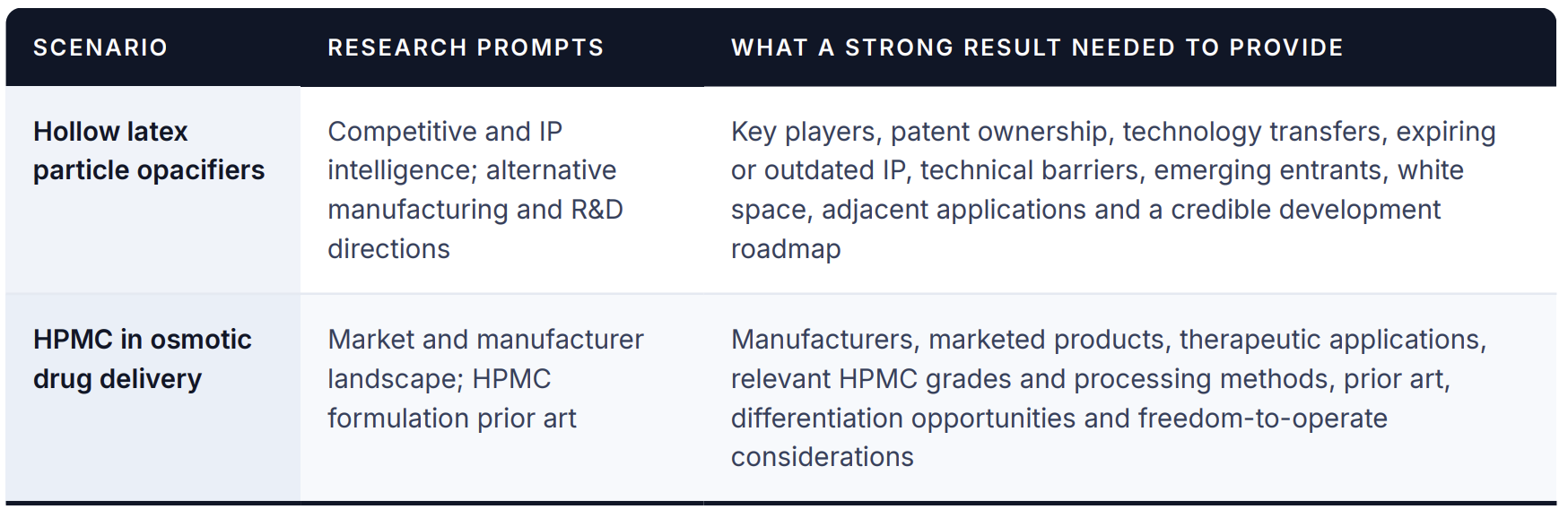
The hollow particle prompts asked the systems to map the competitive and IP landscape, identify emerging participants in Mexico and Asia, detect licensing or corporate activity and locate white space. They were then asked to recommend alternative materials, particle architectures and manufacturing mechanisms that could support a defensible product strategy.
The osmotic delivery prompts asked the systems to identify manufacturers and marketed products, followed by an analysis of HPMC grades, viscosity specifications, processing methods, prior art and potential formulation strategies.
Where the tools diverged
All three tools were capable of producing a credible general summary. The meaningful differences appeared as the work moved from describing the landscape to deciding what to do next.
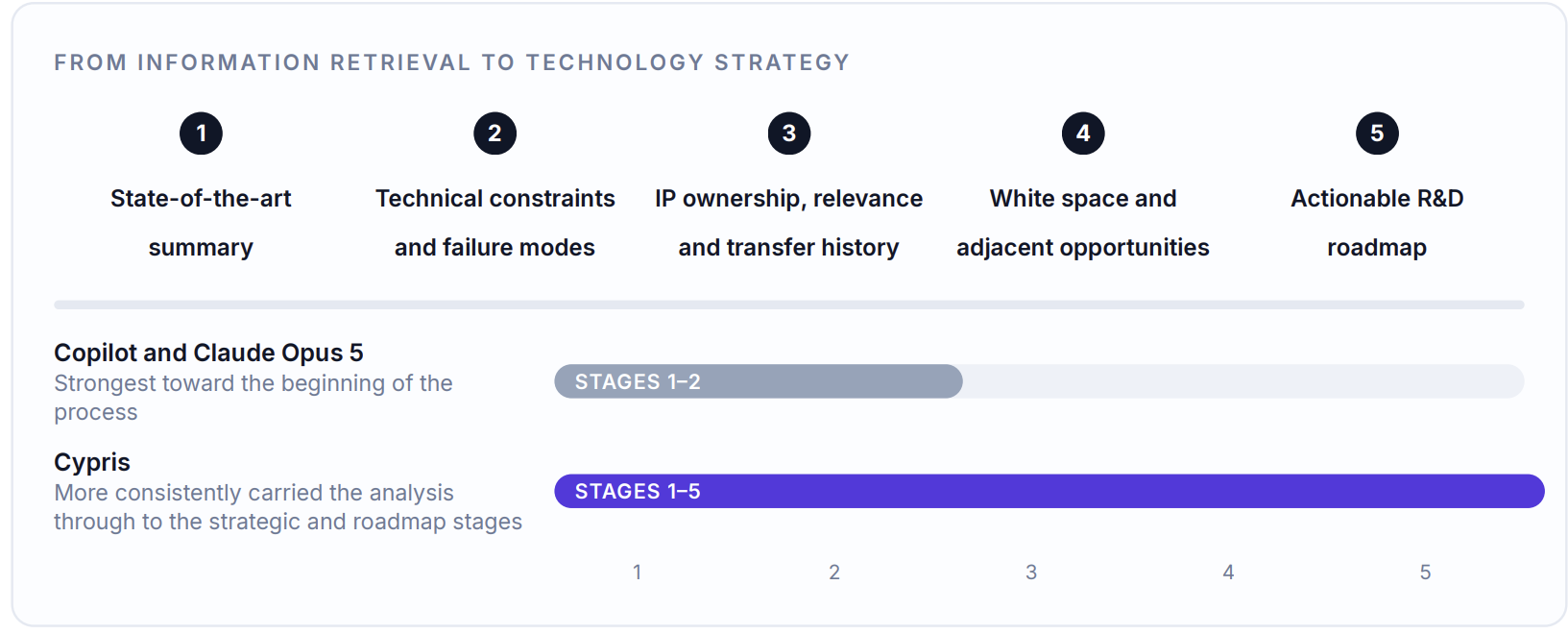
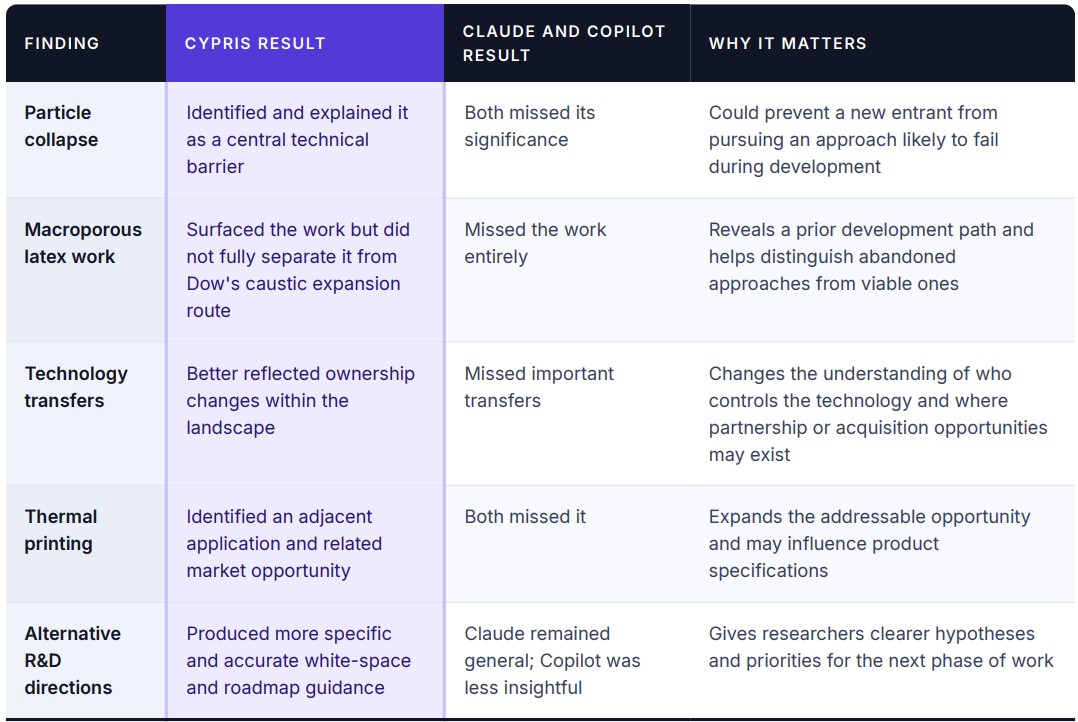
Devon found that Cypris produced the strongest overall result, with the clearest advantage in the more technically and strategically complex hollow particle scenario. Claude and Copilot generally summarized what had been published. Cypris more frequently identified the specific technical issues, changes in IP ownership, commercial signals and research directions that could influence an actual development program.
Comparative findings at a glance
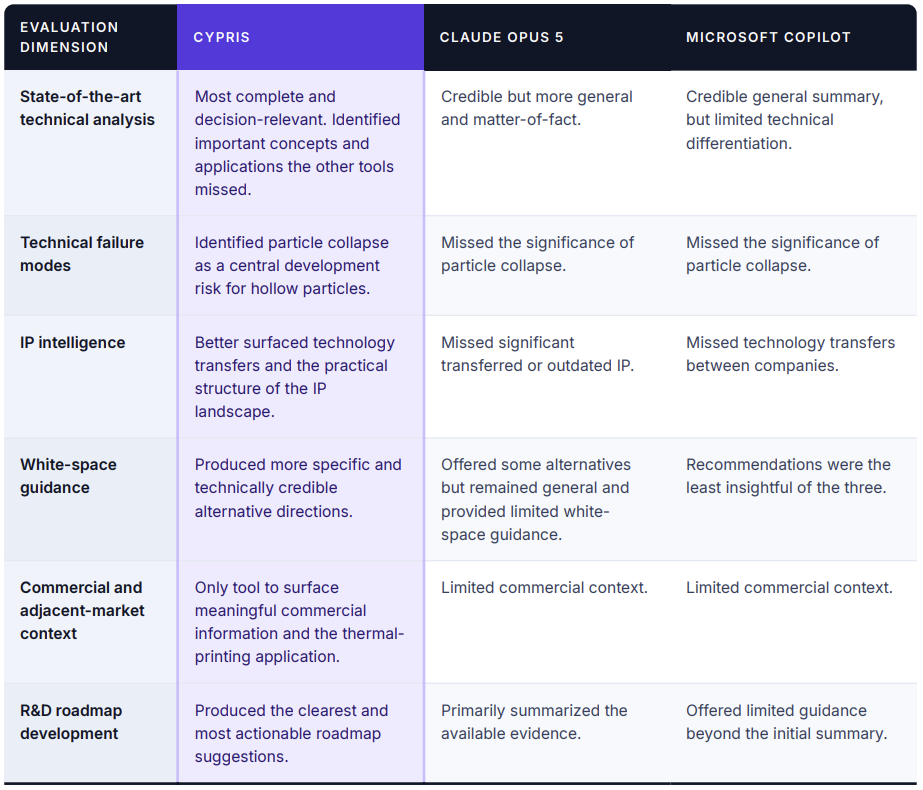
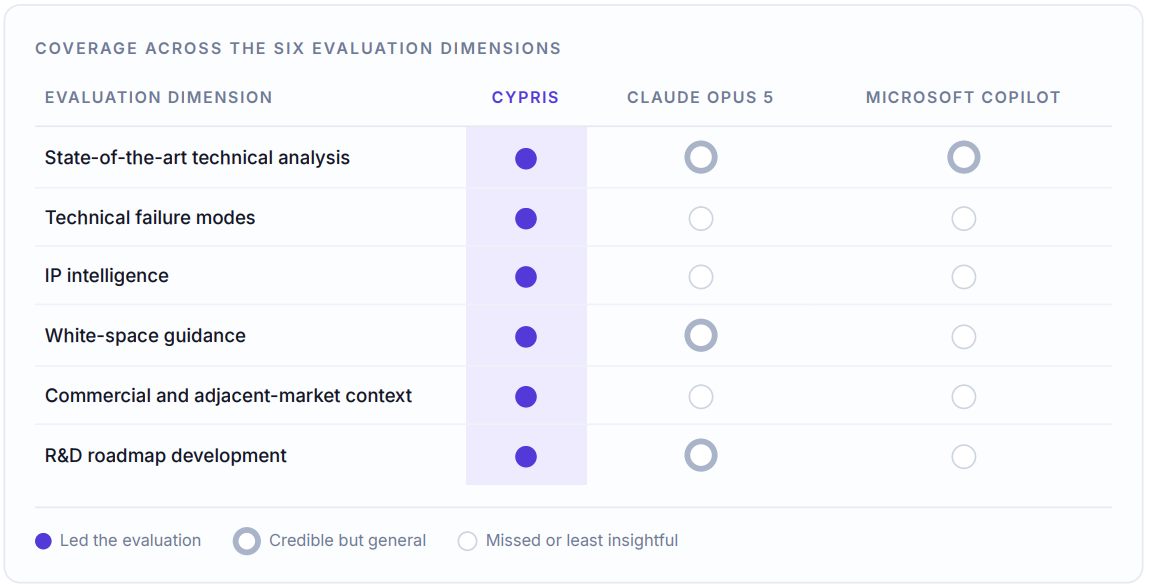
These distinctions were particularly visible in Devon's analysis of technical implementation, IP transfers, market context and research direction.
Scenario One: Hollow Latex Particle Opacifiers
All three tools passed the baseline test
Each system produced a reasonable summary of the general hollow particle landscape. Devon found no serious factual errors within the information each tool chose to present.
That baseline performance was important, but it did not determine the outcome. The systems differed substantially in the usefulness of their output for technical strategy development, with Cypris holding the clear advantage.
Cypris identified the technical issue most likely to derail a new entrant
One of the most consequential differences involved particle collapse.
Cypris recognized that maintaining particle structure was a central technical challenge and produced a useful explanation of the issue. Claude and Copilot did not identify its importance.
For a researcher, this was not a minor omission. A new entrant that fails to understand or overcome particle collapse could invest considerable time and capital in a manufacturing approach that does not perform under practical conditions. By surfacing the issue, Cypris provided information that could directly alter experimental priorities and development sequencing.
Cypris was not flawless. It did not fully distinguish between Dow's hollow latex work using caustic expansion and a separate abandoned macroporous latex approach. However, Claude and Copilot missed the macroporous work entirely.
The distinction illustrates the difference between partial technical interpretation and simple omission. Cypris found the relevant body of work but needed greater precision in separating the approaches. The general AI tools failed to surface the alternative development path at all.
Cypris produced a stronger picture of the IP landscape
Patent landscapes are often presented as lists of companies, filings and portfolio sizes. For technology strategy, that is rarely sufficient.
Researchers need to understand whether patents remain active and relevant, whether they have been transferred, whether the underlying technology is commercially practiced and whether a seemingly large portfolio contains meaningful gaps.
Claude and Copilot missed technology transfers between companies. Devon also found that Claude failed to recognize that significant portions of the IP landscape had changed hands or become outdated. These omissions can distort the competitive picture by assigning technology to the wrong owner or treating historically important patents as if they still define the current opportunity.
Cypris provided a more useful view of how the IP was structured and where potential white space existed. This helped move the analysis beyond a patent count and toward questions such as:
- Who currently controls the relevant technology?
- Which patents still create meaningful barriers?
- Where has ownership changed?
- Which approaches appear abandoned or underdeveloped?
- Where could a new entrant build, partner or acquire?
Devon noted that all three tools could be improved by incorporating deeper patent-office and file-wrapper information, maintenance status, litigation history and citation patterns. Those signals help determine whether a portfolio is genuinely defensible or simply appears strong based on volume.
Cypris surfaced technical and commercial concepts the others missed
Cypris was the only tool to identify the use of hollow particles in thermal printing. It also suggested additional markets and alternative applications.
That finding demonstrated a broader advantage in state-of-the-art analysis. Cypris did not restrict the output to the most obvious use of hollow particles as opacifiers. It connected the underlying technology to another commercially relevant application that Claude and Copilot failed to identify.
The distinction matters because technical strategy requires answering two different questions:
- Can the organization develop the technology?
- Is the opportunity commercially worth pursuing?
Claude and Copilot largely addressed the first question through general technical summaries. Cypris brought in more of the information required to begin addressing the second.
Some commercial outputs still required scrutiny. Devon considered Cypris' estimated 10 percent compound annual growth rate for the broader hollow particle market questionable, although its approximately 5 percent estimate for the thermal-printing segment appeared reasonable. The advantage was not that every market figure was definitive. It was that Cypris recognized adjacent commercial applications and incorporated them into the strategic analysis at all.
Cypris produced more useful white-space and roadmap recommendations
Both Cypris and Claude suggested alternatives to conventional latex-based particle systems. Copilot's recommendations were less insightful.
The quality of the alternatives, however, was different. Claude's output was more general and matter-of-fact. It identified possible approaches but did not translate them into strong white-space guidance.
Cypris proposed more technically credible alternatives and connected them more directly to a differentiated development strategy. Its roadmap recommendations were clearer about which directions merited further investigation and how the research could be sequenced.
The alternatives included non-latex and ceramic-based particle systems. The evaluation did not establish that every proposed direction was commercially viable, but Devon knew that some ceramic particles had progressed at least as far as commercial trials. Cypris therefore surfaced technically relevant research leads rather than merely generating hypothetical possibilities.
Specific findings that changed the strategic value of the output
Scenario Two: HPMC in Osmotic Drug Delivery
The baseline outputs were more similar
The osmotic drug-delivery scenario produced less separation between the three systems.
All three generated credible summaries of osmotic pump technology and identified, to varying degrees, the grades and functions of HPMC in the existing landscape. Devon found relatively little to distinguish the tools on the initial market, manufacturer and prior-art questions.
The systems also converged on a similar roadmap recommendation: use a Design of Experiments process to optimize HPMC for the different roles it plays in the formulation.
While technically valid, Devon considered that recommendation underwhelming. It represented a standard development methodology rather than a differentiated technical insight.
Cypris generated the most promising next research direction
The difference appeared when Cypris suggested a possible connection between osmotic delivery and the challenge of formulating poorly soluble drugs.
Many active pharmaceutical ingredients have limited aqueous solubility, creating substantial formulation and absorption challenges. Cypris' analysis pointed toward a possible connection with hydroxypropyl methylcellulose acetate succinate, or HPMCAS, a material used in approaches for poorly soluble drugs.
HPMCAS is distinct from the HPMC traditionally used in osmotic systems, and Cypris did not present the connection as a validated solution. Instead, it surfaced a cross-domain clue that an experienced researcher could recognize and investigate further.
Devon viewed this as a meaningful example of how technical research often progresses. The first search does not always deliver the final answer. A strong research system should also reveal the next productive question.
Cypris did that more effectively. It connected information from an adjacent technical area to the osmotic formulation problem, creating the basis for a more differentiated next prompt and potential research direction.
The Core Finding: Technical Intelligence Begins Where the Summary Ends
The comparison showed that general-purpose AI tools can produce useful technical summaries. Both Claude Opus 5 and Microsoft Copilot identified relevant companies, scientific concepts and prior art across the two scenarios.
Cypris separated itself in the work that followed:
- Recognizing a technical failure mode that could derail a development program
- Identifying ownership changes and outdated IP that altered the competitive landscape
- Finding adjacent applications such as thermal printing
- Producing more specific white-space guidance
- Connecting evidence to a clearer R&D roadmap
- Generating cross-domain clues that informed the next research question
This distinction reflects the role of the intelligence layer surrounding the foundation model. A general-purpose model is optimized to explain the available information coherently. A technical intelligence system must also organize patents, scientific literature, companies, materials and market signals into a structure that supports decisions.
Final assessment
Across the four prompts, Cypris produced the strongest overall performance.
The advantage was clearest in the hollow particle scenario, where Cypris demonstrated superior technical analysis, stronger IP intelligence, more credible white-space identification and more actionable roadmap recommendations. Claude Opus 5 was capable of producing credible summaries and some alternative ideas, but remained more general and missed important IP changes and white-space implications. Microsoft Copilot met the baseline requirement for landscape summarization but provided the least differentiated strategic guidance.
The osmotic delivery scenario was more competitive, but Cypris still produced the most promising next research direction by connecting the problem to an adjacent material and formulation challenge.
The conclusion was not simply that Cypris found more information. It more consistently identified the information that mattered.
For an experienced technical leader, that is the difference between receiving a summary of the landscape and receiving the raw material required to build a technology strategy.
Former Dow Research Fellow Compares Cypris, Copilot & Claude for Chemical Intelligence
All Blogs

What are the steps of scientific innovation? The process of scientific innovation can be complex and daunting. But, with the proper steps in place, one can move forward to create a successful product or technology.
From defining the problem to commercialization and implementation, understanding these key stages of scientific innovation is essential for any R&D team looking to innovate effectively. By following the five steps we will outline here, teams can ensure they are taking all necessary actions on their path from idea generation through final launch. So let’s discover together: what are the steps of scientific innovation?
Table of Contents
Assigning Roles and Responsibilities
Commercialization and Implementation
Conclusion: What Are the Steps of Scientific Innovation?
Defining the Problem
What are the steps of scientific innovation? The first step is to define the problem, which is also the first step in the scientific method.
Defining the problem is an essential step for any R&D and innovation team. Identifying the need helps teams understand what areas require improvement or development, as well as which solutions will be most effective in addressing these needs.
Investigating potential solutions entails examining current technologies and trends to decide how they can be implemented to resolve a given issue. Setting goals and objectives provides clarity on desired outcomes, enabling teams to measure progress and success over time.
When identifying the need, teams need to consider customer feedback, industry trends, market demands, and technological advancements when determining what problems should be addressed first. It’s also beneficial for teams to use research tools such as surveys or interviews with stakeholders to gain insights into potential pain points that could benefit from further exploration or development.
Researching solutions requires a deep dive into current technology offerings and available resources within an organization’s network of partners or vendors. Teams should look at competitors’ products or services to identify gaps that could potentially lead them toward creating innovative new products or services of their own. Additionally, researching industry trends allows organizations to stay ahead of emerging opportunities while avoiding pitfalls associated with outdated approaches that may no longer yield positive results due to changing markets or customer preferences.
Once the problem has been clearly defined, teams can begin to explore solutions and generate ideas for innovation. To do this effectively, brainstorming strategies must be employed to evaluate potential concepts and refine them into viable products or services.
Key Takeaway: R&D and innovation teams need to identify needs, research solutions, and set goals to successfully innovate. To do so effectively they must consider customer feedback, industry trends, market demands, and technological advancements before delving into competitor offerings or leveraging their network of partners and vendors. By establishing clear objectives with specific metrics linked back to identified needs progress can be measured over time for successful results.
Generating Ideas
What are the steps of scientific innovation? Generating ideas for research and projects is a vital part of the innovation process.
Brainstorming is an effective way to generate multiple potential solutions quickly. Gathering a team of diversely-minded individuals is key to successful brainstorming, as it can help generate creative solutions.
(Source)
To ensure a safe space for open discussion, it is essential to establish that all ideas should be voiced without fear of criticism or judgment. To ensure that the most innovative ideas are discussed, it’s helpful to set ground rules like no idea is too small or silly before beginning the session. Additionally, setting a time limit helps keep the conversation focused on generating as many ideas as possible within that timeframe.
It is essential for those with a vested interest to consider the financial viability, expansiveness, and implications of each potential solution before making any decisions. Anticipating any issues that may arise during implementation is critical for a successful outcome. Thus it’s important to think ahead and address any red flags before moving forward.
Brainstorming and stakeholder input are essential for successful research and innovation projects. Set ground rules, assess cost-effectiveness, and anticipate potential issues to get the best outcome. #ResearchInnovation #IdeaGeneration Click to Tweet
Developing a Plan of Action
What are the steps of scientific innovation? Innovation requires developing a plan of action. It involves establishing a timeline, allocating resources and budgeting, and assigning roles and responsibilities.
Create a Timeline
To ensure the successful completion of the project, it is essential to create a timeline with deadlines for each task. Start by breaking down the project into smaller tasks with specific deadlines for each task.
Think about what should be done to finish each job, plus any hindrances that may come up while doing so. Once you have identified these items, create an overall timeline that outlines when each step should be completed by. Utilizing tools such as Gantt charts can help keep everyone involved in the project organized and on track with their respective tasks.
Allocating Resources
Allocating resources is also important when developing a plan of action for your research or innovation team’s project. This includes identifying what materials are needed, who will provide them, how much they cost, and where they need to be sourced from.
Additionally, it’s wise to consider which personnel are best suited for different parts of the job at hand, such as those who have experience in coding, designing experiments, collecting data, or commercialization. By doing this upfront planning, you’ll ensure that your team has everything it needs before beginning work on its project.
Assigning Roles and Responsibilities
Finally, assigning roles and responsibilities ensures that every member knows exactly what their role entails so there’s no confusion throughout the assignment. To do this effectively, start by creating detailed descriptions outlining duties associated with various positions like a lead researcher or product developer engineer.
Then assign individuals accordingly based on skill set capabilities while keeping an eye out for areas where collaboration between members might benefit outcomes even further than working alone would achieve.
By following these steps when developing a plan of action, you will increase efficiency throughout your R&D or innovation team’s projects while saving time and money in the process. Creating a timeline, budgeting resources, designating duties, and allocating roles are essential to attaining maximum efficiency while saving time and funds. Doing this upfront planning ensures that your team has everything it needs before beginning work on its project which will result in more successful outcomes.
Innovation requires constructing a blueprint of activity, to make sure the project stays on course and within the budget. To further refine the process, testing, and experimentation are necessary to evaluate results and make adjustments as needed.
Key Takeaway: An effective plan of action for an R&D or innovation project should include setting a timeline, allocating resources, and budgeting appropriately, as well as assigning roles and responsibilities. Putting in the groundwork upfront to ensure your team has everything it needs before getting started will pay off dividends later down the line.
Testing and Experimentation
What are the steps of scientific innovation? Testing and experimentation are essential steps in the R&D process. Experiments help to validate hypotheses, identify areas of improvement, and provide data-driven insights into product development.
When designing experiments and prototypes, it is important to consider factors such as scalability, cost efficiency, reliability, accuracy, speed of implementation, and results analysis.
Prototyping
Prototypes should be designed with the end goal in mind.
What will you measure? What kind of data do you need to collect? How long does each experiment take?
Will there be any safety concerns or hazards associated with testing?
These questions should all be answered before beginning an experiment or prototype design. Testing the prototype’s operation and practicality can be done after its development.
Data Collection and Analysis
Data collection is also a key component when testing a prototype. Collecting accurate data helps inform decisions about potential changes or improvements that could be made during the refinement process.
Analyzing results from tests is critical for making adjustments as necessary based on feedback from users or other stakeholders involved in the project. A variety of methods can be used to analyze test results including statistical analysis tools such as:
- Regression models.
- Machine learning algorithms.
- Qualitative surveys.
- Interviews.
- Focus groups.
- Field trials.
By evaluating user feedback alongside performance metrics such as time-to-market or customer satisfaction ratings, teams can make informed decisions regarding product enhancements or changes needed before launch.
Testing and experimentation are invaluable components within the R&D cycle which allow teams to validate ideas while gathering valuable insights into how products perform under various conditions. This leads to successful commercialization outcomes through iterative cycles of refinement and optimization over time.
Key Takeaway: R&D relies on experimentation and assessment to confirm suppositions and acquire useful data regarding product performance. By collecting accurate data, analyzing results from tests, as well as user feedback through qualitative surveys or interviews among other methods.
Commercialization and Implementation
What are the steps of scientific innovation? Commercialization and implementation of a research or innovation project are essential parts of any innovative process.
Commercialization and implementation require careful planning, execution, and assessment to ensure success. Identifying potential markets for the product or service is key to launching it successfully. This involves researching current trends in the industry, understanding customer needs and preferences, analyzing competition, and assessing market opportunities.
Once potential target markets have been identified, a business plan must be formulated that accounts for all relevant factors like cost structure, income sources, desired consumers, and pricing approach.
Finally, a launch strategy should be developed that outlines tactics for introducing the product or service to its intended audience while also taking into account any risks associated with its introduction.
R&D managers and engineers must be diligent in having an innovative process to ensure the successful commercialization of their projects.
R&D teams need to plan, execute & assess carefully when commercializing their projects. Research trends, understand customer needs & create a business model for success. #innovation #research Click to Tweet
Conclusion: What Are the Steps of Scientific Innovation?
What are the steps of scientific innovation? The scientific method is a complex and often iterative process. It requires an in-depth understanding of the problem at hand, creative thinking to generate ideas, careful planning for implementation, and testing through experimentation before commercialization can take place.
By utilizing research platforms that provide access to data sources quickly, teams can accelerate their journey toward successful innovations with greater speed and accuracy than ever before.
Unlock the power of R&D and innovation teams with Cypris. Our platform provides rapid time to insights, allowing you to centralize data sources for maximum efficiency.

Are you struggling to learn how to prioritize innovation ideas in your organization? Deciding which ideas should be pursued and which should wait can be a challenging task. Fortunately, there is an effective way of doing this that will help streamline the process and ensure success.
In this blog post, we’ll explore how to identify the right ideas for prioritization, develop an evaluation framework, leverage technology for efficiency gains, build an innovation culture within your team, and measure success when it comes time to implement them. Let’s learn how to prioritize innovation ideas!
Table of Contents
How to Prioritize Innovation Ideas
Developing an Evaluation Framework
Defining Criteria for Evaluation
Creating an Action Plan for Implementation
Leveraging Technology to Streamline the Process
Automated Idea Management Systems
Building an Innovation Culture in Your Organization
Measuring the Success of Prioritized Ideas
Tracking Progress and Performance Metrics
How to Prioritize Innovation Ideas
Prioritizing innovation ideas is essential for R&D and innovation teams. It is imperative to distribute resources productively so that ventures have an optimal chance of success. To identify the right ideas to prioritize, it’s important to assess the potential impact, evaluate the feasibility, and understand resource requirements.
Assess Potential Impact
Assessing potential impact involves considering how successful an idea might be if implemented. Factors such as customer demand or market opportunity should be taken into account when assessing an idea’s potential return on investment (ROI). Moreover, analyzing the expenditure of time and resources required can assist in deciding whether a project is worth pursuing.
Evaluate Feasibility
Evaluating feasibility requires looking at both technical and non-technical elements of a project before committing resources towards its development. Technical factors include understanding any existing technology constraints or dependencies that may limit progress. At the same time, non-technical considerations involve analyzing available skill sets within your team or organization which could affect implementation timelines.
It is important to prioritize the right ideas for innovation, as this will ensure successful outcomes. Developing an evaluation framework can help you make informed decisions and guide your team in implementing them effectively.
Key Takeaway: In learning how to prioritize innovation ideas, teams need to consider a combination of ROI, technical feasibility, and resource availability assessments. Taking into account customer demand, market opportunity, and skillsets within your team or organization will help you cut through the noise and make informed decisions about which projects are worth investing in.
Developing an Evaluation Framework
Developing an evaluation framework is a critical step in idea prioritization. It helps teams prioritize ideas and decide which ones to pursue. Organizations can maximize their chances of success by defining criteria for evaluation, establishing a scoring system, and creating an action plan for implementation.
Defining Criteria for Evaluation
Defining the criteria for evaluation is essential to make informed decisions about which ideas should be pursued. Teams should identify what matters most when evaluating new concepts – such as potential impact, feasibility, resources required, or customer needs – and create clear guidelines on how each will be measured.
This will help ensure that all stakeholders are aligned on the criteria used when assessing projects.
Establishing a Scoring System
Establishing a scoring system allows teams to quantify their evaluations and compare different ideas objectively against one another. Each criterion should have its weight depending on its importance relative to other factors being considered.
This score can then be used to rank projects from highest priority down through least important priorities The scoring system should also take into account any external factors that may affect the outcome of a project such as industry trends or competitive landscape analysis.
Creating an Action Plan for Implementation
Having an action plan ensures that teams can move forward with their chosen idea efficiently and effectively. It should outline specific tasks that need completing to bring them to fruition successfully within given timelines and budget constraints if applicable.
An action plan should include steps such as:
- Research and development activities.
- Product design and testing.
- Marketing strategy development.
- Production planning and scheduling.
With this, everyone involved knows exactly what needs to be done at each stage of the process before launch day arrives.
Developing an evaluation framework is essential in learning how to prioritize innovation ideas, as it provides the necessary structure to ensure ideas are properly assessed and evaluated. Leveraging technology can further streamline this process by utilizing data analytics tools, automating idea management systems, and implementing collaboration platforms.
Key Takeaway: By defining criteria for evaluation, establishing a scoring system, and creating an action plan for implementation, organizations can ensure their chosen innovation ideas are pursued in the most effective way possible. It’s all about getting your ducks in a row to guarantee success.
Leveraging Technology to Streamline the Process
The use of technology can be an invaluable asset for streamlining the process of prioritizing innovative ideas. Data analytics tools, automated idea management systems, and collaboration platforms are all powerful tools that can help to make idea prioritization more efficient and effective.
Data Analytics Tools
Data analytics tools provide R&D teams with insights into which ideas have the most potential for success. By analyzing data points such as customer feedback, market trends, and industry benchmarks, these tools can identify opportunities that may otherwise go unnoticed. Based on data-driven insights, R&D teams can prioritize projects accordingly.
Automated Idea Management Systems
Automated idea management systems enable teams in capturing, organizing, and prioritizing ideas in one central location. These systems can keep tabs on each idea, from its start to completion, so the team is aware of where resources are going at any given moment.
(Source)
In addition, automated idea management systems often include features such as voting capabilities or gamification elements which further facilitate team collaboration and engagement when it comes to selecting new initiatives or assessing existing ones.
Collaboration Platforms
Collaboration platforms offer distributed teams the opportunity to collaborate seamlessly across multiple locations without compromising productivity or quality control. With real-time updates on task progress and integrated communication channels such as chat rooms or video conferencing, these platforms provide teams with the flexibility needed to remain agile in today’s fast-paced environment while allowing them to effectively collaborate.
By leveraging technology to streamline idea prioritization, organizations can gain a competitive edge in the innovation race. To further capitalize on this advantage, companies must build an innovative culture within their organization by encouraging creativity and risk-taking, fostering open communication and collaboration, and promoting knowledge sharing and learning.
Key Takeaway: Using data analytics tools, automated idea management systems, and collaboration platforms to their fullest potential can help R&D teams prioritize ideas with maximum efficiency. These powerful technologies enable teams to make informed decisions quickly, track progress accurately and collaborate across multiple locations without compromising productivity or quality control.
Building an Innovation Culture in Your Organization
Organizations that benefit from idea prioritization must create an environment that encourages creativity and risk-taking. To do this, it’s important to foster open communication and collaboration between teams, as well as promote knowledge sharing and learning. This will help ensure that ideas are discussed openly and new perspectives are considered.
Encouraging creativity starts with providing employees with the freedom to explore their ideas without fear of failure or criticism. By allowing employees to take risks in a safe space, organizations can create an atmosphere where creative thinking is rewarded instead of punished for mistakes made along the way. It also helps if leadership models this behavior by taking calculated risks themselves, so others feel empowered to do the same.
To cultivate an innovative atmosphere within the organization, it is essential to foster open communication between all departments. Encourage R&D managers and engineers, product development personnel, and scientists at all levels to come together regularly for problem-solving sessions or brainstorming ideas for potential commercialization opportunities.
By having everyone’s input on board, teams can leverage different perspectives when prioritizing ideas or tackling challenges they may be facing in their workflows.
Key Takeaway: Organizations should foster a setting that boosts imaginative thought and chances taking by endorsing open dialogue, exchanging of knowledge, and joint issue solving. By fostering a safe space for employees to explore their ideas without fear of failure or criticism, organizations can foster innovation while encouraging leaders to take calculated risks as well.
Measuring the Success of Prioritized Ideas
In learning how to prioritize innovation ideas, a crucial step is measuring the success of their implementation. Tracking progress and performance metrics, analyzing results, adjusting strategies accordingly, celebrating achievements, and learning from failures are all key components of idea prioritization.
Tracking Progress and Performance Metrics
Tracking progress and performance metrics can help you understand how well your team is doing on their current project or initiative. This could include measuring completion rate against deadlines, assessing customer feedback on products or services, or tracking financial performance related to a particular idea. By monitoring the relevant data points over some time, you can determine if your concept is having its desired effect.
Analyzing Results
Analyzing results allows teams to identify areas for improvement in their projects as well as opportunities for growth and expansion. It’s important to look at data from multiple sources – such as customer surveys, financial reports, and market research studies – when analyzing so that decisions are based on accurate information rather than assumptions or guesswork.
Teams must adjust strategies accordingly based on these findings. Otherwise, any efforts may be wasted if they continue down the wrong path without making necessary changes along the way.
Celebrating Achievements
Celebrating achievements should also be part of the evaluation process since it encourages team morale and motivation while providing recognition for the hard work done by individuals within the organization who have contributed towards successful outcomes.
It is also essential not to evade failure. Rather, use them as chances for growth that can lead to further advances in upcoming undertakings carried out by the team. Going forward into new ventures with confidence knowing what works best given certain scenarios will help ensure success.
Key Takeaway: Analyzing performance metrics and adjusting strategies accordingly is key to assessing the success of innovation ideas. It’s essential to recognize successes and glean lessons from missteps to remain at the forefront, providing teams with a substantial store of wisdom for upcoming projects.
Conclusion
Learning how to prioritize innovation ideas is essential for any organization that wants to stay ahead of the competition. By taking the time to identify and evaluate potential projects, develop an evaluation framework, and leverage technology to streamline processes, organizations can ensure their ideas are successful.
Additionally, prioritizing innovation within your team will help foster creativity, and measuring success with key performance indicators allows teams to track progress in real-time. With these strategies in place, you’ll be well on your way toward achieving maximum ROI from all innovative initiatives.
Discover how Cypris can help your R&D and innovation teams prioritize their ideas quickly with our centralized data platform. Take advantage of the insights you gain to make faster, smarter decisions for your business.

Apple is renowned for its pioneering and progressive approaches. It’s no shock that Apple has set up a structure to promote creativity and maintain its products at the forefront of the market. And learning how Apple is organized for innovation gives us a lot of lessons for setting up companies for success.
From cultivating creative ideas to developing innovative solutions, Apple understands how important it is to stay organized for innovation if they want success now and into the future. But what does this look like?
How do they overcome challenges when innovating? And can other companies learn from Apple’s approach? Let’s explore these questions as we investigate how Apple is organized for innovation.
Table of Contents
How Apple Is Organized for Innovation
Apple’s Culture: Fostering Innovation
Encouraging Creativity and Risk-Taking
What Are the Challenges of Innovating at Apple?
What Companies Can Learn From Apple
How Apple Is Organized for Innovation
Apple’s organizational structure is a hierarchical system that allows the company to efficiently manage its vast global operations. Apple’s org structure has a centralized decision-making process, promotes creativity and innovation, and provides well-defined pathways of communication between departments.
How Apple is organized for innovation allows the company to remain competitive in today’s fast-paced market by fostering collaboration and encouraging risk-taking.
At the top of Apple’s hierarchy sits CEO Tim Cook who oversees all aspects of the business from product development to marketing strategies. At the helm of Apple’s board is a team of renowned industry leaders, such as former Vice President Al Gore and Oracle Chairman Larry Ellison, who guide the company in making decisions on product development, acquisitions, and investments.
The next level down consists of executive teams responsible for specific areas within Apple such as hardware engineering or software design.
Each team has dedicated leaders with years of experience in their respective fields who are responsible for driving innovation within their division while also managing resources efficiently across multiple projects at once. They collaborate regularly to ensure alignment between different departments while ensuring that any changes they make are consistent with overall company goals and objectives set by Cook himself.
(Source)
Below this layer lies individual project teams consisting mostly of engineers tasked with developing innovative solutions to customer problems or creating new products entirely from scratch based on market research conducted before the development phases begin.
These teams consist mainly of developers but can also contain designers depending on what type of project it is working on. All members report directly to either one member from executive leadership or straight to Cook himself if necessary.
This provides direct access to feedback throughout the entire process allowing quick iterations when needed. It reduces the wait through lengthy bureaucratic processes typically seen in larger organizations.
Finally, there exists another layer beneath these individuals made up of administrative staff who handle day-to-day tasks related to running the business such as HR, payroll, accounting, and legal affairs. This group helps ensure that everything else runs smoothly so executives can focus solely on developing future products and services.
In short, Apple’s organizational structure promotes strong collaboration, efficient decision-making, rapid iteration, and the ability to respond quickly to changing markets.
How Apple is organized for innovation has allowed them to stay on top of the game in terms of pioneering, by emphasizing imagination, and being unafraid to take chances. Leveraging technology for innovation is just one of the many ways Apple fosters creative thinking among its employees.
Key Takeaway: How Apple is organized for innovation: its structure is geared towards innovation and efficiency, with a hierarchical system in place that enables quick decision-making. Executive teams are responsible for driving product development while individual project teams focus on creating innovative solutions to customer problems. This well-oiled machine ensures the innovative company remains competitive by responding quickly to changing markets.
Apple’s Culture: Fostering Innovation
Apple is acclaimed for its innovative goods and services, with a great deal of this accomplishment coming from its methodology of promoting creativity.
Encouraging Creativity and Risk-Taking
Apple encourages creativity and risk-taking by allowing employees to explore new ideas without fear of failure. This culture has enabled the company to create groundbreaking technologies such as the iPhone, iPad, and Macbook Pro.
Empowering Decision Making
Empowering employees to make decisions is another key factor in Apple’s ability to innovate. Apple enables personnel, regardless of rank, to take on tasks and make decisions that will be beneficial for both the consumer and the firm. By giving employees autonomy over their work, they can think outside the box while still staying within guidelines set by senior management.
Using Cutting-Edge Technology
Since its inception in 1976, Apple has employed cutting-edge technology to create groundbreaking solutions that have transformed the way people use technology daily. Utilizing AI, ML, NLP, AR, VR, blockchain tech, cloud computing, quantum computing, 5G networks, and robotics automation systems along with data analytics platforms as tools to push the boundaries of innovation has been one of Apple’s core strategies.
This approach enables them to stay ahead of the curve and keep their customers engaged while staying within guidelines set by senior management.
Investing in R&D
Investing in research & development (R&D) is also an important part of Apple’s strategy for fostering innovation. Through R&D investments into areas like AI/ML/NLP research labs around Silicon Valley or even acquisitions such as Shazam or VocalIQ – Apple continues pushing boundaries with every new product release.
Apple has shown its dedication to pioneering through its corporate ethos, tech investments, and concentration on R&D. Despite these efforts, innovating at Apple comes with challenges such as managing complexity and scale while keeping up with rapidly changing markets.
Key Takeaway: Apple’s culture of encouraging creativity and risk-taking, coupled with its investment in cutting-edge technology and research & development has enabled them to stay one step ahead of the competition when it comes to innovation. Apple encourages personnel to take risks and explore novel ideas, allowing them to create revolutionary items that captivate customers.
What Are the Challenges of Innovating at Apple?
Innovation is a key component of Apple’s success. We have looked at how Apple is organized for innovation. Yet, there are difficulties to be handled for the business to stay successful and competitive.
Managing Complexity and Scale
Managing complexity and scale is one of the biggest challenges faced by Apple when innovating. With over 2 million employees across the globe, keeping track of ideas and ensuring they are properly implemented can be difficult.
Rapidly Changing Markets
Additionally, rapidly changing markets can make it hard for Apple to stay ahead of competitors who may have access to different technologies or resources than Apple does. Finally, maintaining quality standards is essential for any innovative product or service offered by Apple as customers expect nothing less than perfection from the brand.
The challenges of innovating at Apple are vast and require a thoughtful approach to overcome. By leveraging data-driven decision-making, developing a culture of continuous improvement, and utilizing agile methodologies for faster results, Apple has been able to navigate these challenges successfully.
Key Takeaway: Apple faces the challenge of managing complexity and scale, staying ahead of competitors in rapidly changing markets, and upholding high-quality standards to ensure successful innovation. To do this effectively they must stay agile while constantly innovating with a keen eye on the future.
What Companies Can Learn From Apple
The main thing that companies should learn from Apple as an innovative company is their focus on establishing clear goals and objectives. Without a strategy in place, it is hard to push for innovation.
Companies should also create an environment that encourages risk-taking and allows employees the freedom to explore creative solutions. Investing in R&D is a must. This could mean supporting internal initiatives as well as partnering with outside groups or educational institutions.
Technology plays an important role in innovation, so companies should leverage existing tools and develop new ones when necessary.
Finally, collaboration between departments and across teams is essential for successful innovation initiatives. Fostering open communication will help ensure ideas are shared quickly and efficiently. By following these steps, other companies can emulate Apple’s innovative culture while achieving their unique successes.
Organize your innovation goals, encourage risk-taking, invest in R&D, leverage tech, and foster collaboration to emulate Apple’s success. #innovation Click to Tweet
Conclusion
Other businesses desiring to up their game could look to how Apple is organized for innovation. By having an organizational structure that fosters creativity and collaboration, and utilizing strategies such as open-ended exploration and prototyping, Apple has been able to create groundbreaking products despite the challenges of innovating at scale.
The main takeaway here is that with proper organization and strategy in place, even large organizations can remain agile enough to innovate effectively.
Unlock the power of data-driven innovation with Cypris. Streamline your R&D and innovation processes to gain valuable insights faster than ever before.

Innovation strategies are important for any company. Businesses that learn how firms internally develop innovation gain tremendous value for their organization. It allows them to have market breakthroughs, adapt quickly and lead product design, and handle issues creatively.
In this article, we look at how firms internally develop innovation. We look at the benefits of internal innovation, different innovation strategies, and examples from different companies.
Table of Contents
What Is Its Difference from External Innovation?
What Are the Benefits of Developing Internal Innovation?
How Firms Internally Develop Innovation
What Are the Different Sources of Internal Innovation?
Challenges of Internal Innovation
Strategies for Successful Internal Innovation
Establishing Clear Goals and Objectives
Utilizing Existing Resources and Expertise
Internal Innovation
Learning how firms internally develop innovation necessitates understanding what it is first. Internal innovation in companies is the process of creating new ideas, products, services, or processes that can be used to improve a company’s operations. It involves leveraging existing resources and expertise within an organization to create something new.
Internal innovation differs from external innovation in that it focuses on developing solutions internally rather than relying on outside sources for help.
What Is Internal Innovation?
Internal innovation is the process of using internal resources such as personnel, technology, data, and other assets to develop innovative solutions that will benefit the business. This could include anything from introducing a new product line or service offering to streamlining operational processes or creating more efficient ways of doing things.
The goal of internal innovation is not only to increase profits but also to make employees feel valued by providing them with opportunities for growth and development through their work.
What Is Its Difference from External Innovation?
External innovation typically involves working with outside partners such as vendors or consultants who bring fresh perspectives and ideas into the mix. While this can be beneficial in some cases, it often requires additional time and money investments. It may not always yield positive results due to a lack of familiarity with an organization’s culture or goals.
On the other hand, internal innovation leverages existing knowledge within an organization which allows teams to quickly come up with creative solutions. In addition, companies don’t need to invest extra resources into research or training outside parties on how they do things differently at their company.
What Are the Benefits of Developing Internal Innovation?
The advantages of cultivating internal innovations are manifold. To begin with, it improves employee engagement by granting them ownership over projects they have invested effort. By also giving them access to different departments where they can apply their expertise, it improves their job satisfaction levels, resulting in higher retention rates.
Developing internal innovation also helps businesses save costs associated with external consulting fees. This is because most if not all tasks related to internal innovations are handled internally leading to lower overhead expenses.
Lastly, it gives businesses a competitive edge over others as they can innovate faster. Their already-established systems and structures make them more adaptable when responding to changing market conditions.
The benefits of internal innovation can be great, from cost savings to improved quality control.
Maximize cost savings, efficiency, and quality control with internal innovation initiatives. Leverage existing resources and data platforms for faster progress monitoring. #innovation #costsavings #leveragetechnology Click to Tweet
How Firms Internally Develop Innovation
Apple Inc.
Apple is a prime example of how firms internally develop innovation. Their development strategy focuses on creating an environment where employees can collaborate and share ideas, as well as providing resources for research and development.
Apple also encourages its employees to think outside the box when it comes to problem-solving. This has led to some of its most innovative products such as the iPhone and iPad.
The result of this approach has been a steady stream of new products that have revolutionized the tech industry and made Apple one of the world’s leading companies in terms of market capitalization.
Google LLC
Google’s internal innovation strategy revolves around encouraging collaboration between different teams within their organization, allowing them to come up with creative solutions that may not be possible if they were working alone.
They also provide generous funding for research projects, giving their engineers access to cutting-edge technology and tools they need to create something truly unique.
As a result, Google has become synonymous with technological advancement due to its groundbreaking products like Google Maps, Gmail, and Chrome browser. These are all developed internally by their team members.
Amazon Web Services (AWS)
Amazon Web Services is a prime example of how firms can create and implement internal innovation strategies that propel them toward success.
AWS provides cloud computing services to businesses worldwide, allowing for data storage online without the need for physical hardware or additional personnel for maintenance tasks such as backups and updates.
By utilizing these technologies internally before offering them through their AWS Marketplace program, Amazon was able to gain significant traction in this area quickly, due largely in part to its focus on developing innovative solutions from within rather than relying solely on external sources or third-party vendors.
(Source)
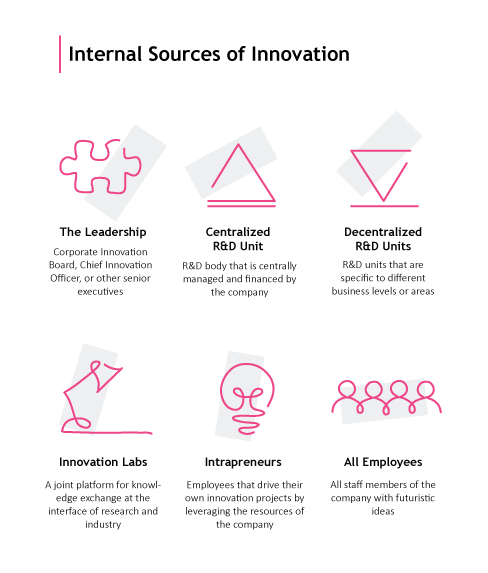
What Are the Different Sources of Internal Innovation?
Innovation is the lifeblood of any organization, and it’s essential for staying competitive in today’s fast-paced business environment. To learn how firms internally develop innovation, let’s look at where innovation comes from within the company. Internal innovation can come from a variety of sources within an organization, each with its unique strengths and challenges.
Leadership
Leadership sets the tone for innovation throughout an organization.
Leaders must create a culture that encourages risk-taking and rewards creativity. They should also provide resources to help employees develop their ideas into tangible products or services.
Finally, leaders need to be open to new ideas coming from outside the traditional power structure of the company.
R&D Units
Research & Development (R&D) units are dedicated teams tasked with developing innovative solutions to problems facing the company or industry as a whole. These teams have access to specialized tools and expertise that allow them to explore cutting-edge technologies and uncover creative solutions quickly and efficiently.
Innovation Units
Innovation units are similar to R&D units but focus on creating new products or services rather than improving existing ones. This type of team typically works closely with marketing departments to ensure that their innovations will be well received by customers when they hit the market.
Employees
Employees at all levels can contribute valuable insights into how processes could be improved or what kind of product features would appeal most strongly to customers’ needs. This happens if employees are empowered and allowed input through surveys, brainstorming sessions, and hackathons.
Companies should make sure they’re actively listening for these kinds of suggestions so they don’t miss out on potentially great ideas just because they didn’t originate at higher levels within the organization hierarchy.
Overall, internal innovation is critical for organizations looking to stay ahead in today’s rapidly changing landscape. However, it requires more than just top-down leadership initiatives. Tapping into all available sources such as R&D units, innovation units, and even individual employees can give companies a major edge over their competitors who may not be taking full advantage of every potential source of insight available.
Internal innovation can come from a variety of sources within an organization, each with its unique strengths and challenges. Click To Tweet
Challenges of Internal Innovation
Innovation from within is key to staying ahead of the competition, yet can be challenging due to restricted assets and experience. Companies must reconcile the demand for innovation with their current resource limitations, which can lead to a lack of funds and time necessary to generate fresh concepts.
Additionally, there are risks associated with internal innovation projects that require careful management. These include potential losses from failed experiments or delays in product development cycles due to unforeseen circumstances.
Time constraints are also an issue when it comes to internal innovation projects. Companies need to set realistic expectations and deadlines while ensuring they have enough personnel and other resources available throughout the project lifecycle. Companies should also factor in unexpected challenges such as changes in customer demands or market conditions that could impact their timeline goals.
Risk management is another key challenge when launching an internal innovation project. Companies must identify any potential risks upfront so they can plan accordingly by allocating additional resources if necessary or making changes to their process as needed during the development phases.
This includes understanding how much capital is required for each stage of the project, assessing customer feedback on prototypes or designs before launch, and developing contingency plans in case something goes wrong during production or delivery stages of the process cycle
The difficulties of internal creativity can be intimidating, yet with the correct systems and assets available to them, organizations can accomplish fruitful outcomes. By leveraging existing resources and expertise, establishing clear goals and objectives, and utilizing technology to streamline processes, organizations can increase their chances for success when it comes to internal innovation.
“Internal innovation is essential for staying ahead but requires careful management of time and risk. #Innovation #RiskManagement #TimeConstraints” Click to Tweet
Strategies for Successful Internal Innovation
Successful internal innovation projects require a clear strategy that focuses on goals, resources, and technology. In learning how firms internally develop innovation, we can extract the following steps:
Establishing Clear Goals and Objectives
Establishing clear goals and objectives is the first step in any successful project plan. Defining specific outcomes for the project helps to ensure that everyone involved understands what needs to be accomplished. It also allows teams to measure progress against their desired results.
Utilizing Existing Resources and Expertise
Utilizing existing resources and expertise is another important part of a successful strategy. By leveraging the knowledge of team members, organizations can save time and money while ensuring quality results are achieved quickly. Finally, leveraging technology to streamline processes can help teams stay organized and efficient throughout their project.
By following these strategies for successful internal innovation projects, organizations will be able to maximize efficiency while effectively achieving their desired outcomes. With clear goals established upfront along with utilizing existing resources and expertise available within the organization combined with innovative technologies, organizations have everything they need at their fingertips to make sure their next big idea takes off.
By implementing the strategies outlined above, organizations can effectively manage their internal innovation processes and achieve success.
Maximize efficiency and achieve desired outcomes with clear goals, existing resources, and innovative tech for successful internal innovation projects. #innovation #R&D Click to Tweet
Conclusion
Learning how firms internally develop innovation helps companies to develop their internal innovation leads. To maximize innovation outcomes, any project’s plan should consider strategies and best practices to address the associated challenges of internal innovation.
Strategies for successful innovation outcomes and best practices should be implemented as part of any project’s plan. Find a comprehensive platform that helps R&D and innovation teams centralize their data sources into one platform to facilitate faster time-to-insights during the development process, enabling them to maximize their potential for creating innovative products or services.
Discover how Cypris can help your R&D and innovation teams develop faster, smarter solutions with centralized data sources. Take advantage of our platform today to unlock the potential of internal innovation.

How do patents and copyrights promote innovation? R&D teams, product developers, scientists, commercialization engineers, and senior directors have discussed the potential impact of patents and copyrights on innovation. Can we determine if these intellectual property frameworks are successful in encouraging the production of novel concepts or technologies?
In this blog post, we will explore what patents and copyrights are as well as their potential benefits to innovation. We’ll also look at some of the challenges posed by patent and copyright systems before examining alternative approaches to stimulating creativity within research and development teams. Let’s answer: how do patents and copyrights promote innovation?
Table of Contents
What Are Patents and Copyrights?
How Do Patents and Copyrights Promote Innovation?
Challenges With Patent and Copyright Systems
Alternatives to Patent and Copyright Systems
What Are Patents and Copyrights?
how do patents and copyrights promote innovation? Patents and copyrights are two kinds of legal safeguards for intellectual property.
A patent provides the possessor with a lawful right to produce, utilize or vend an innovation for a limited timeframe. Copyrights protect original works such as literary, dramatic, musical, artistic, and other creative works from unauthorized copying or reproduction.
A patent is a form of intellectual property right that grants the inventor exclusive control over their invention, prohibiting others from making, using, or selling it without permission. Copyrights safeguard unique creations, such as literary works, sound recordings, artworks, and sculptures, from being replicated without the copyright proprietor’s authorization.
Utility, design, and plant patents are the three main types of patent protection available. Copyright can be divided into five categories: literary works, musical compositions, visual arts, audio-visuals, computer software programs/apps, and sound recordings, among others.

(Source)
Patent and copyright systems provide economic benefits to society at large, as these protections encourage investment in research and development activities leading to new products and services. This creates jobs and stimulates growth within markets.
Legally protecting the owners of intellectual property, patents, and copyrights enable them to gain monetary benefits from their inventions. This provides a powerful incentive for inventors and creators, which in turn promotes innovation. Moving on, let us now explore how patents and copyrights can promote innovation even further.
Patents & copyrights provide economic benefits to society by encouraging R&D investment in new products, services & jobs. #Innovation #IPRights Click to Tweet
How Do Patents and Copyrights Promote Innovation?
Patents and copyrights are powerful instruments for stimulating innovation. They do this by safeguarding intellectual property rights to encourage creators to invest in research and development and produce new products or services.
By protecting intellectual property rights, they provide an incentive for creators to invest in research and development and create new products or services. Patent systems protect inventions from being copied by competitors. Copyrights protect original works such as books, music, films, software, etc. from unauthorized use or reproduction.
Patents and copyrights safeguard creators’ ideas by granting them exclusive legal rights over their inventions or work for a set duration. This provides a sense of security to creators, allowing them to receive their due compensation for the effort they have put in and encouraging further investment into research and development. It also encourages investment in R&D since companies know they won’t be undercut by copycats stealing their ideas.
Investors can have greater confidence when investing in innovative startups due to the legal protection afforded by patents, reducing the risk of another company copying the idea without authorization. Patent systems provide inventors with financial security and enable them to take risks on R&D projects knowing that if successful they will be able to capitalize exclusively on their work, something not possible with open-source models where anyone can access it freely without permission or recompense.
Patents and copyrights can be seen as incentives to foster creativity since they secure intellectual property rights while also motivating investments in research and development. Despite their advantages, the patent systems and copyright systems have certain drawbacks that must be addressed to ensure they are used optimally.
Key Takeaway: Patents and copyrights serve as a safeguard, safeguarding creators’ intellectual property from misappropriation, thereby encouraging them to invest in R&D. This offers a safeguard to creators financially, as well as instilling trust in investors when looking at investing in new enterprises. As such, patents and copyrights play an important role in promoting innovation.
Challenges With Patent and Copyright Systems
How do patents and copyrights promote innovation? Patents and copyrights can be powerful instruments for safeguarding intellectual property rights, yet they may present a range of difficulties. The process of obtaining patent or copyright protection can be lengthy, costly, and offer a limited scope of protection.
The first challenge is the length of time it takes to obtain a patent or copyright. Obtaining a patent or copyright can be a lengthy endeavor, taking months or even years to complete depending on the complexity of the invention or work. Filing fees and other necessary paperwork may be required to attain a patent or copyright, with costs varying based on the complexity of the protected invention/work.
Another issue is cost. Obtaining a patent or copyright can be expensive due to attorney’s fees and other associated costs such as research expenses related to searching prior art databases for potential conflicts with existing patents/copyrights.
Furthermore, if an infringement occurs after securing protection then legal action must be taken which could result in further financial losses depending on the outcome of any court proceedings.
Despite their capacity to incentivize invention, there are various issues connected with patent and copyright regulations that may impede advancement. However, alternative methods such as open source licensing models, creative commons licensing models, and crowdfunding platforms for financing R&D projects offer viable alternatives which may be more suitable in certain contexts.
Key Takeaway: Securing a patent or copyright can be difficult and expensive, but it is necessary to preserve intellectual property rights. It may take months or even years for the protection to come through, with hefty filing fees and potential legal costs if infringement occurs down the line. Despite the challenges, patents and copyrights are still essential for preserving creativity in today’s highly competitive market.
Alternatives to Patent and Copyright Systems
Patent and copyright regulations have long been employed as the main methods for safeguarding intellectual property, yet they are not the only solutions available. There are alternative methods for promoting innovation that doesn’t rely on traditional patent systems or copyright systems.
Open source licensing models, creative commons licensing models, and crowdfunding platforms for financing R&D projects can all be used to incentivize creativity and innovation while protecting intellectual property rights.
Open-source Licenses
Open-source licenses provide an effective way to protect software innovations without relying on patents or copyrights. These licenses let coders give out their code to others with some regulations, like permitting people to modify and share the code without restrictions but disallowing them from asserting authority over it. This encourages collaboration between developers while still giving them control over how their work is used.
Creative Commons
Creative Commons licenses provide creators with a way to protect their works, such as music, art, literature, and others by specifying which uses of them are allowed. By doing so, these licenses ensure that creators maintain some level of control over how their works are used while still encouraging collaboration between artists in various fields.
Crowdfunding
Crowdfunding sites offer innovators and scientists a way to obtain financial aid for their ventures without surrendering power over their inventions or ideas. By tapping into a global pool of investors who believe in the project, these platforms enable individuals to acquire capital that may have otherwise been inaccessible. Moreover, this allows them to remain at the helm of whatever endeavor they pursue with those funds raised through crowdfunding efforts.
Overall, open-source licensing models, creative commons licensing models, and crowdfunding platforms offer viable alternatives when compared to traditional patent and copyright systems when it comes to promoting innovation and creativity while protecting intellectual property rights.
Alternative methods of encouraging creativity, such as open-source licensing, Creative Commons models, and crowdfunding sites can be employed to finance R&D.
Key Takeaway: Rather than relying solely on patents and copyrights, alternative methods such as open source licenses, Creative Commons models, and crowdfunding can be used to protect intellectual property while allowing for collaboration. Open source licenses, Creative Commons models, and crowdfunding can provide viable alternatives for safeguarding creativity while encouraging innovation. This gives creators more control over their work without sacrificing collaboration opportunities.
Conclusion
How do patents and copyrights promote innovation? When utilized correctly, patents and copyrights can be advantageous for spurring creativity. Despite their potential effectiveness, certain issues with patent and copyright systems must be addressed to maximize the innovation-promoting capabilities of these tools.
Alternatives such as open-source models or Creative Commons licenses may also provide a viable option for encouraging innovation without relying on traditional forms of intellectual property protection. Ultimately, it is up to organizations to decide which system works best for their needs and goals when attempting to do patents and copyrights to promote innovation.
Unlock the power of innovation with Cypris, a research platform designed to provide rapid time to insights for R&D and innovation teams. Harness intellectual property rights such as patents and copyrights through our platform to promote creativity and drive progress.

Google Scholar is a reliable source of research data and information for R&D teams. With its advanced search capabilities, comprehensive indexing of scholarly literature, and a vast range of resources available to researchers, Google Scholar can be an invaluable tool in the pursuit of innovation. But how reliable is Google Scholar?
This blog post will explore what makes Google Scholar so reliable by examining how it works, exploring its advantages and disadvantages as well as looking at alternative sources that may provide comparable results. Whether you’re an experienced researcher or just getting started with your project, understanding the reliability offered by Google Scholar is essential to ensure successful outcomes from your work. So let’s answer: how reliable is Google Scholar?
Table of Contents
How to Use Google Scholar Effectively
Advantages of Using Google Scholar
Disadvantages of Using Google Scholar
Alternatives to Google Scholar
Conclusion: How Reliable Is Google Scholar?
What Is Google Scholar?
how reliable is Google Scholar? Google Scholar is a free search engine developed by Google that enables users to find scholarly literature from journals, books, and other sources.
Google Scholar offers a vast selection of scholarly works, including journal articles, conference papers, theses, dissertations, and preprints. Google Scholar is widely used by researchers due to its sophisticated algorithms and comprehensive selection of scholarly material from various sources.
Google Scholar’s accessibility and availability provide a major benefit to researchers. With its powerful algorithms and comprehensive coverage of academic literature across all disciplines, it offers open access to millions of documents from different sources including open-access repositories like PubMed Central or arXiv – something that traditional library databases can’t offer.
With its user-friendly interface, Google Scholar enables researchers to quickly refine their searches based on various criteria such as author name or publication year, thus optimizing the research process.
Verifying the accuracy and reliability of sources can be a challenge when using Google Scholar, due to its lack of editorial oversight on many documents indexed. In addition, it only provides access to a limited number of sources compared with more comprehensive search engines like Scopus or Web Of Science. Although these may require payment for full-text access.
Google Scholar is a powerful tool for research and innovation teams to quickly access relevant information. By understanding how to use Google Scholar effectively, you can maximize its potential in your research process.
Key Takeaway: Google Scholar is a powerful search tool that offers unrestricted access to vast amounts of data from diverse origins, thus rendering it an invaluable asset for researchers. However, the accuracy and reliability of some indexed materials may be questionable due to their lack of editorial oversight and limited source accessibility.
How to Use Google Scholar Effectively
How reliable is Google Scholar? We can make it reliable by learning how to use it effectively. Using Google Scholar effectively can be a game-changer for R&D and innovation teams.
Getting set up with an account is the initial step for utilizing Google Scholar efficiently, taking only a few moments of your time. Once you have set up your account, Google Scholar’s extensive resources will be available to you.
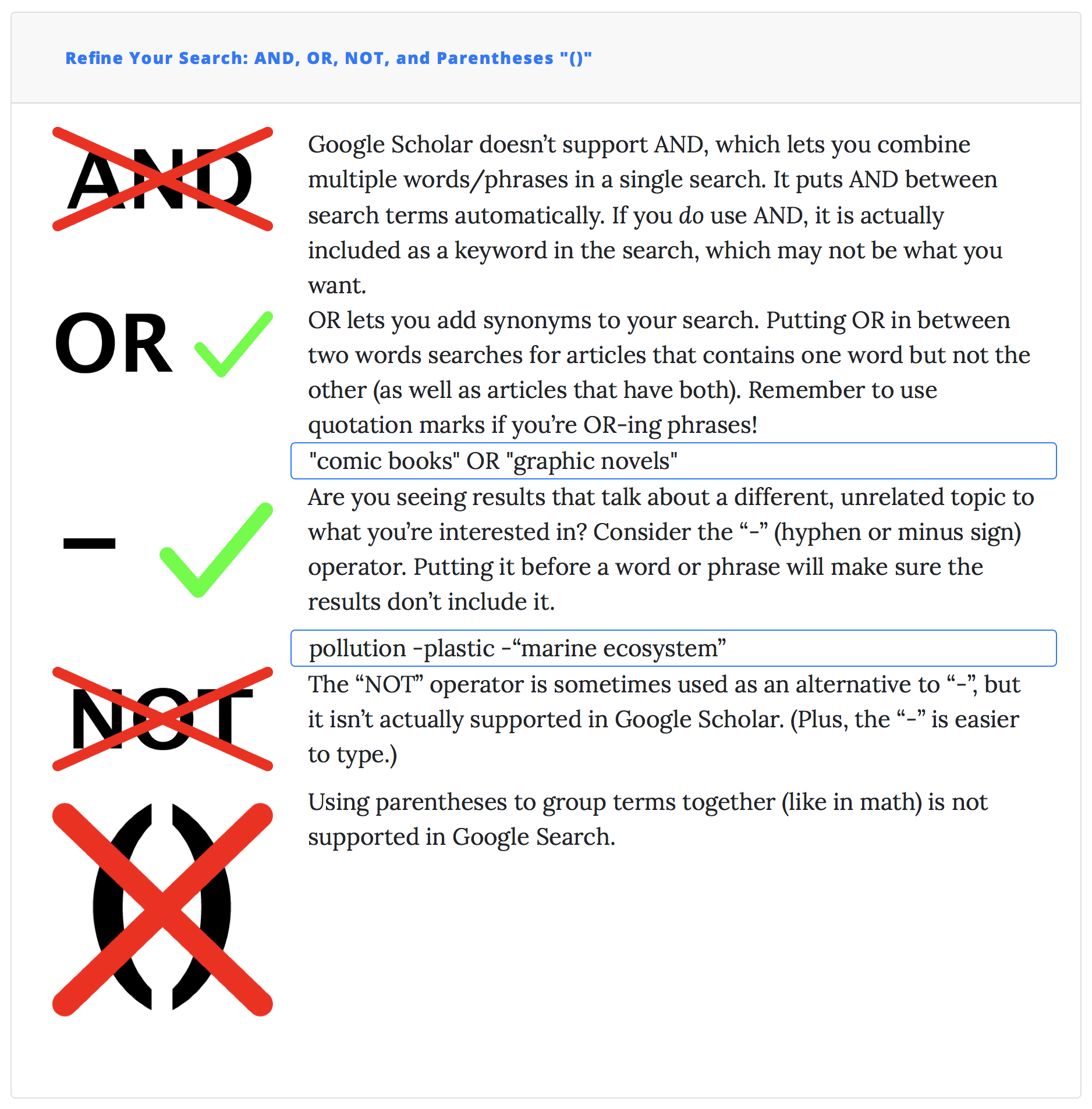
To begin searching for relevant information, use keywords that are related to your research topic or question. You can also refine your results by using advanced search options such as language, author name, and year of publication if needed. Keeping track of all the sources you find during this process is essential to avoid duplicating work and ensure accuracy in citations when writing reports or articles later on.
Google Scholar’s convenience and breadth of resources, providing access to thousands of scholarly articles from various disciplines worldwide with just a single click, make it an ideal tool for researchers at all levels. Furthermore, its user-friendly interface makes navigation easy even for those who may not have had much experience with online databases or search engines – making it ideal for researchers at all levels.
In addition, its comprehensive coverage includes both peer-reviewed journals as well as books and conference proceedings. This ensures that no source goes undiscovered during your research process.
(Source)
Unfortunately, there are some limitations associated with using Google Scholar. This is primarily because many universities do not provide full-text access so finding complete versions can be difficult sometimes (unless they are open access).
Additionally, since most content indexed by Google scholar comes from external websites there’s always a risk involved regarding verifying accuracy and reliability, especially when citing sources in publications or reports. Lastly, a limited number of sources available could lead researchers towards missing out on important references while conducting their research projects thus hampering progress significantly over time.
Alternatives exist if you need more specific material than what’s offered through Google Scholar alone. This includes academic search engines like Scopus and Web of Science as well as library databases such as JSTOR and ProQuest. There are also open-access journals like PLOS ONE and BMC.
Each platform offers unique advantages depending on what kind of data/information one needs exactly, so make sure to explore them thoroughly before deciding which option best suits individual requirements.
Using Google Scholar effectively can save time and effort when researching topics. With its comprehensive coverage of academic literature, it is a valuable tool for R&D teams to have in their arsenal. By taking advantage of the advantages discussed above, research teams will be able to quickly access relevant information and refine their results with ease.
Key Takeaway: Google Scholar is a great asset for R&D and innovation teams, providing easy access to thousands of scholarly articles from all over the world. Although it has its limitations such as not having full-text access or difficulty verifying accuracy and reliability, there are plenty of other search engines available which can be explored depending on individual requirements. All in all, Google Scholar is an invaluable tool that shouldn’t be overlooked when conducting research.
Advantages of Using Google Scholar
Google Scholar is a powerful tool for research and innovation teams, offering comprehensive coverage of academic literature from various sources. Google Scholar enables research and development teams to remain abreast of the most recent advances in their field, providing access to a broad range of scholarly literature. Users can quickly locate pertinent data that satisfies their requirements through the user-friendly interface.
One of the main advantages of using Google Scholar is its availability and accessibility of resources. Google Scholar offers an extensive selection of resources, such as books, journals, articles, and conference proceedings which makes it a valuable research tool.
Furthermore, these resources are easily accessible as they are available online with just a few clicks away; this saves time and effort when searching for information. Google Scholar has been designed with simplicity in mind, making it easy for even those unfamiliar with search engines to use.
Another advantage offered by Google Scholar is its comprehensive coverage of academic literature across different disciplines such as science and technology, engineering and medicine, and others, thus providing valuable insights into current topics within each field or area of study.
This helps researchers stay updated with the most recent advancements in their fields while also giving them access to other related topics that could help broaden their understanding further on certain subjects or domains. Additionally, through advanced search options like filtering by author name or publication year, users can refine results according to specific criteria which makes finding relevant information easier and more efficient.
How reliable is google scholar? Overall, Google Scholar provides a convenient and accessible platform for researchers to access an abundance of academic literature. Despite its benefits, Google Scholar also has some potential drawbacks that should be considered before use; these will be explored further in the following section.
Key Takeaway: Google Scholar is a go-to platform for research and innovation teams, offering easy access to an extensive range of academic literature. It provides users with the latest information in their field through its user-friendly interface, while also allowing them to refine results by author name or publication year making it easier to find relevant data quickly and efficiently.
Disadvantages of Using Google Scholar
Though its usefulness is undeniable, one must be aware of certain drawbacks when using Google Scholar for research.
One of the main disadvantages of using Google Scholar is the limited number of sources available. While it does have an extensive collection, it only includes certain types of content such as journal articles, books, conference papers, and patents.
This platform may not provide access to other types of materials such as periodicals or magazines. Additionally, many databases are not included in Google Scholar’s search engine which can make finding relevant information more difficult than if you were searching on another platform such as Academic Search Engines or Library Databases.
Another disadvantage of using Google Scholar is verifying the accuracy and reliability of sources found within its database. Since anyone can upload their work for Google Scholar indexing, there’s no assurance that all results are valid or dependable since they have not been verified by specialists in the field before being posted online.
Therefore, users must take extra caution when evaluating results from this platform before relying on them for research purposes or making any decisions based on these findings.
How reliable is Google Scholar? Overall, it is clear that Google Scholar has some disadvantages when used as a research tool. Therefore, researchers should consider other alternatives to find reliable sources of information for their projects.
Key Takeaway: Google Scholar provides a wealth of academic literature, but is limited in its scope and reliability. Users should be aware that not all sources indexed by the platform have been vetted or verified for accuracy. Thus extra caution must be exercised when evaluating results from Google Scholar to ensure reliable research findings.
Alternatives to Google Scholar
There are other search engines and databases that can provide more comprehensive coverage of academic literature than Google Scholar. Scopus and Web of Science offer researchers a wealth of peer-reviewed journals, conference papers, book chapters, and other scholarly material. Library databases like JSTOR and ProQuest also provide access to scholarly resources from leading publishers in the humanities, sciences, social sciences, and business disciplines.
Open Access Journals such as PLOS ONE or BMC are freely available online publications with content that is published under an open license allowing readers to use the material without any restrictions. These alternatives offer researchers greater control over their searches by allowing them to refine their results according to specific criteria (e.g., publication date range).
Open Access Journals like PLOS ONE or BMC offer users the opportunity to store their searches, permitting them to monitor their progress on a given topic or research project throughout its duration. By taking advantage of these tools researchers can get better insights into the topics they’re researching while ensuring accuracy and reliability in their sources at the same time.
Research smarter, not harder. Take advantage of reliable alternatives to Google Scholar like Scopus, Web of Science & Open Access Journals for comprehensive coverage and better insights. Click to Tweet
Conclusion: How Reliable Is Google Scholar?
How reliable is Google Scholar? While it has some disadvantages such as its inability to provide full texts of articles or the need for manual sorting through results.
Overall, Google Scholar provides an invaluable resource that can be used in combination with other tools to maximize the efficiency of any team’s research process. With careful consideration and the use of alternatives when necessary, Google Scholar can help your team make informed decisions quickly and reliably.
How reliable is Google Scholar? Discover the reliability of Google Scholar with Cypris, a research platform designed to provide rapid time-to-insights for R&D and innovation teams. Uncover valuable insights quickly and efficiently by centralizing data sources into one comprehensive platform.

Has the question, “How do I find citations in google scholar?” been on your mind? Do you need to find citations for your research? Google Scholar can be a powerful tool in helping you quickly locate and access scholarly information.
But how do you go about finding the right citation when using this search engine? In this blog post, we’ll answer “how do I find citations in google scholar” and discuss tips on how to get the most out of this research platform. We’ll also cover My Library and Alerts features which allow researchers to keep track of their research more easily than ever before.
Table of Contents
How Do I Find Citations in Google Scholar?
Utilizing the Advanced Search Options Effectively
Keeping Track of Your Research with My Library and Alerts
What Is Google Scholar?
Google Scholar is an online search engine for scholarly literature and research. Google has created a comprehensive, convenient platform for researchers and academics to access millions of articles from various sources. With access to millions of articles from books, journals, websites, and other sources all in one place, it’s become an invaluable tool for finding relevant information quickly.
Accessing Google Scholar is a breeze. With its straightforward design, you can easily find the info you need without having to work through multiple menus or search functions.
Its ability to filter results by relevance or date allows you to hone in on the most pertinent content first and foremost, while also providing links to both free and paywalled sources. This saves you time from switching between different databases or subscription services. In sum, this resource is a must-have for anyone seeking comprehensive data with ease.
How do I find citations in Google Scholar? Simply go online and type “Google Scholar” into any web browser’s address bar; then click on the link that appears at the top of your screen (it should be labeled “Google Scholar”).
Once there you can begin searching immediately – no registration is required. To make things even easier you can also download their mobile app which gives you quick access right from your phone or tablet device whenever needed.
Overall, Google Scholar has become an indispensable tool in many academic circles as well as R&D departments across industries due to its ease of use combined with powerful filtering capabilities allowing users quick access to high-quality research material no matter where they are located.
Google Scholar is a powerful tool for researchers to access scholarly literature, enabling them to quickly find the information they need. With its advanced search options and refined results, it can help R&D teams uncover relevant citations faster than ever before.
Key Takeaway: Google Scholar is a must-have for researchers and academics. Its user-friendly layout facilitates the speedy discovery of pertinent material, with a vast selection of sources such as books, periodicals, and websites all in one spot. Its powerful filtering capabilities and mobile app allow users quick access anytime anywhere. Google Scholar has become an invaluable resource for any researcher or academic looking for comprehensive research material.
How Do I Find Citations in Google Scholar?
Google Scholar is a powerful search engine for finding citations related to any topic. Google Scholar grants access to a range of materials from across the internet, including scholarly articles and books. But how do I find citations in Google Scholar?
Advanced Search Options
With its advanced search options, you can refine your results and find exactly what you’re looking for quickly and easily. To refine your search results, you can use keywords and Boolean operators (AND/OR/NOT) in the Google Scholar search bar. This will bring up a list of relevant results that can be further refined using filters such as date range or language.

(Source)
Advanced Search Options allow users to create complex searches with multiple criteria which enable them to get very specific about their research needs without having too many irrelevant hits cluttering up their results list. For example, if you are looking for papers written between two dates by an author with certain credentials then these options would help narrow down your query significantly compared with just typing words into the general search box alone.
Filter
Narrowing down your hunt for facts on a particular field is an essential measure when using Google Scholar. You can do this by selecting one or more filters from the left-hand side menu such as author name or publication year range. In addition, you can also sort through different types of sources including books, journals, and conference proceedings using Advanced Search Options located under More > Advanced Search Options tab on the main page of Google Scholar.
My Library and Alerts
For those who need even more control over their research process, there are additional features available within the My Library section where users can save documents they have found during their searches so they don’t have to look them up again later on. This is great for those doing ongoing work.
Additionally, the Alerts feature allows users to set notifications when new material appears online that matches their interests, meaning they never miss out on any potential findings related directly back to their original queries.
How do I find citations in Google Scholar? By utilizing the advanced search options effectively, understanding different citation formats, and knowing when to use other sources besides Google Scholar, you can ensure that your team is getting the most accurate information available.
Key Takeaway: Google Scholar is an invaluable tool for researchers, allowing them to quickly and easily find citations related to their topic of interest. By utilizing powerful search parameters such as filters and Boolean operators, users can refine their results to an unprecedented level of precision, streamlining the research process. Additionally, features like My Library and Alerts make it easier than ever before to stay on top of new findings that may be relevant to any given query.
Utilizing the Advanced Search Options Effectively
How do I find citations in Google Scholar? Using its advanced search options, Google Scholar can help researchers and innovators quickly locate relevant information by narrowing down the number of results returned. To maximize the utility of Google Scholar, it is essential to be familiar with its multiple functions and when other sources might be more suitable.
Google Scholar provides several different ways for users to filter their searches, including by author name, publication year, and subject area. This allows researchers to quickly narrow down their search results and focus on finding only those papers that are most relevant.
Additionally, users can also use Boolean operators such as “AND” or “OR” to combine multiple keywords into one query. For example, if a researcher wanted to find articles related to both “artificial intelligence” AND “machine learning” they could enter this exact phrase into the search bar instead of searching for each term separately.
When researching with Google Scholar, it is important to be aware that different citation formats may yield varying levels of detail and relevance depending on the research topic.
The two main types of citations used by Google Scholar are APA style (American Psychological Association) and MLA style (Modern Language Association). Both styles provide authors’ names along with article titles but APA includes additional details such as publisher names while MLA does not include any publisher information at all.
By utilizing the advanced search options, understanding the different citation formats, and knowing when to use other sources besides Google Scholar effectively, you can easily find citations in Google Scholar.
Key Takeaway: Google Scholar is a great tool for finding citations, offering advanced search options to narrow down results and two different citation formats – APA style and MLA style. By employing its advanced filtering abilities, users can easily locate the essential details they need without having to sift through extraneous material.
Keeping Track of Your Research with My Library and Alerts
Organizing and tracking one’s research can be an intimidating challenge, particularly when using Google Scholar. Fortunately, Google Scholar provides a range of functions to assist with the efficient organization and administration of research.
My Library is a great way to create a personalized library on Google Scholar that stores all the citations you need in one place. You can also set up alerts for new results related to your search queries so you never miss out on any relevant findings. Additionally, staying up-to-date with your research interests is easier than ever with Google Scholar’s advanced search options.
Creating a personalized library on Google Scholar allows you to store all the citations you need in one convenient place. To create your personalized library, simply go to “My Library” on Google Scholar and select “Create New Collection” from the dropdown menu.
From there, type in keywords related to what kind of citations or topics you want to be included in your collection and hit enter. It’s that easy. Once saved, these collections will appear under “My Library” whenever you log into Google Scholar so they are always accessible for quick reference or review anytime.
Setting up alerts for new research results ensures that no matter how busy life gets, important updates won’t slip through the cracks when conducting research via Google Scholar. All it takes is setting up notifications based on specific criteria such as keywords or authors. Just click “Alerts” from either within My Library or from anywhere else on the site and follow the instructions provided by Google scholar (which include selecting frequency).
With this feature enabled, users will receive emails whenever new content matching their criteria becomes available online. This helps keep them informed without having to constantly monitor every change manually.
Tracking your research with My Library and Alerts allows you to stay abreast of the most recent progressions in your discipline. Understanding how to use Google Scholar effectively is an essential skill for any researcher or innovator.
Stay informed about new developments in #R&D and innovation with Google Scholar’s My Library and Alerts. Find relevant citations quickly and properly cite references for original research or analysis. Click to Tweet
Conclusion
Google Scholar is a great resource for researchers and innovators to quickly find citations related to their work. How do I find citations in Google Scholar? By using the search tools, My Library feature, and alerts system provided by Google Scholar, users can easily keep track of relevant research materials that are necessary for successful R&D projects.
With its powerful search capabilities and easy-to-use features, you can efficiently locate pertinent information without wasting valuable time or resources.
Discover how Cypris can help you quickly and easily find citations in Google Scholar. Leverage our research platform to save time, reduce costs, and gain insights faster than ever before.


Are you looking for a way to add patent information to your research? Google Scholar is an invaluable tool that can help R&D and innovation teams find the insights they need quickly. Want to learn how to add patent to Google scholar? Adding patents to Google Scholar allows users to search through millions of documents, including both published literature and issued patents.
In this blog post, we’ll discuss what Google Scholar is, how to add patent to Google scholar, and provide tips on analyzing results in the platform. So let’s get started by exploring what adding patent data to google scholar means.
Table of Contents
Adding Patents to Google Scholar
Analyzing Your Results in Google Scholar
FAQs in Relation to How to Add Patent to Google Scholar
How do I add a patent in Google Scholar?
What does ‘include patents’ mean on Google Scholar?
How does an article get into Google Scholar?
What is Google Scholar?
Google Scholar is a free, powerful search engine that allows users to quickly find scholarly literature worldwide. It indexes millions of articles, books, and other sources across a variety of disciplines. With Google Scholar, researchers can easily locate relevant research material in one place and access it from any device with an internet connection.
The benefits of using Google Scholar are numerous. By utilizing its sorting capabilities, Google Scholar enables users to quickly access relevant research material for their needs. Additionally, its ability to sort results by relevance makes finding specific information easier than ever before. Finally, the advanced search capabilities allow users to refine their searches even further by narrowing down results based on author names or publication dates.
Accessing Google Scholar is simple; simply type your query into the search bar at scholar.google.com or download the mobile app for iOS or Android devices directly from their respective app stores. Once you have logged in, you can immediately begin your search.
Google Scholar is a powerful tool for researchers to access relevant scholarly literature and can be used as an invaluable resource in the research process. Gaining an appreciation of patents and the potential advantages they can offer to businesses or organizations will help determine when it’s suitable to include them in Google Scholar.
Unlock the power of research with Google Scholar. Easily locate relevant scholarly material, refine searches by author or date & access it from any device. #GoogleScholar #ResearchMadeEasy Click to Tweet
What is a Patent?
A patent grants exclusive rights to a creator or their assignee for an established period, safeguarding the invention from unauthorized utilization, selling, duplication, and more. Patents protect the underlying invention from being copied, used, sold, or otherwise exploited without the permission of the patent holder. Generally speaking, patents are granted by governments and provide protection in exchange for disclosing information regarding the invention.
Patents can be acquired both domestically and internationally, depending on the intended market for the invention or product. There are three main types of patents: utility patents, design patents, and plant patents. Utility patents cover inventions that involve new processes or machines; design patents cover ornamental designs for products; and plant patents cover newly discovered varieties of plants.
Benefits of patenting include safeguarding against infringement from rivals, plus elevating public consciousness of your product or service by means of publication on official government websites such as the USPTO. Additionally, having a patent may help attract investors who want to fund further development and commercialization efforts related to your invention. Finally, obtaining a patent may also increase the value of your business should you decide to sell it down the line since potential buyers will be able to see how much effort went into protecting your idea with legal protections such as those provided by patented technology.
A patent is a legal instrument that grants an inventor exclusive rights to their innovation, which can be highly beneficial for any entity. Adding patents to Google Scholar can help increase the visibility of your research and discoveries, allowing them to reach wider audiences.
Key Takeaway: Patents provide a legal shield to inventors and their assignees by granting exclusive rights over an invention for a limited period of time. Obtaining patents can bring multiple benefits such as preventing competitors from infringing upon the underlying invention, increasing public awareness through publication in official records like USPTO website, attracting investors who are willing to fund further development or commercialization efforts and adding value if you decide to sell your business down the line.
Adding Patents to Google Scholar
Adding patents to Google Scholar can be a great way for R&D and innovation teams to gain insights into the latest research in their field. By adding patent information, teams can quickly search and analyze data related to their products or services. This process involves understanding how patents work, as well as taking the necessary steps to add them to Google Scholar.
Realizing the significance of a patent for R&D groups is the first step. A patent is an exclusive right granted by a government that allows inventors to protect their inventions from being copied or used without permission. Obtaining a patent also provides companies with legal protection against competitors who may try to copy their invention or use it without authorization. R&D teams should be knowledgeable about the various patent types in order to decide which is most suitable for their new products or services when filing applications.

(source)
Go to your Google Scholar profile page, open “Scholar Settings,” and select “Add Patent” in the “Patent Search Settings” section. Input all pertinent details about your patent – title, abstracts, citations (if applicable) – and hit “Save Changes” at the bottom of the page for it to appear in searches with relevant keywords related to your invention/patent topic area(s). By inputting your patent details into Google Scholar, you are giving research teams a useful resource to expeditiously explore and evaluate data connected with their offerings or services.
In order to optimize the results when searching through these added patents via keyword queries on Google Scholar, it is advisable to ensure that all relevant terms are incorporated into each query and include synonyms associated with keywords. Additionally, narrowing down results based on date range parameters, setting filters according to language preferences, sorting results by relevance rather than chronology, reviewing publications cited within each returned result item thoroughly before deciding whether it’s applicable/relevant enough for further analysis, and utilizing advanced search operators such as quotation marks around phrases (“”), Boolean operators AND & OR, asterisks (*) between words (easter*) will be beneficial.
Adding patents to Google Scholar can be a powerful way for R&D and innovation teams to gain valuable insights into their research. With the right approach, it can help them make more informed decisions about their work. Now let’s examine how we can utilize Google Scholar to analyze these findings.
Key Takeaway: Adding patents to Google Scholar can be a great way for R&D and innovation teams to gain insights into the latest research in their field. By understanding what a patent is, inputting pertinent details about your patent on Google Scholar’s “Add Patent” page, and optimizing keyword queries with relevant terms & filters, you’re providing valuable data that could give your team an edge over competitors.
Analyzing Your Results in Google Scholar
Analyzing Your Results in Google Scholar is a critical step for any R&D and innovation team. Teams can tap into the capabilities of Google Scholar to swiftly acquire patent info from all corners of the globe, permitting them to obtain knowledge regarding their research projects in a more expeditious manner than ever before. Using Google Scholar to analyze results is an essential step for R&D and innovation teams, so here we provide some tips on how to do this effectively.
The analysis process begins with accessing Google Scholar and searching for relevant patents related to your project. Once you have identified the patents that are most relevant to your project, it’s time to analyze them further. Once the relevant patents have been identified, a detailed assessment should be undertaken to determine their relevance based on factors such as filing date, claims, and technical details that may impact your project, in addition to any competitor patents which could affect your research or IP rights. Additionally, you should also take note of any competitor patents that may affect your own research efforts or intellectual property rights.
Teams should consult experts if needed during this phase of analysis to effectively understand the bigger picture and assess how individual patents fit together within a larger context, both technically and strategically. This requires deep knowledge in areas such as engineering principles and legal precedents around intellectual property law. Therefore, it is essential to analyze what has been patented and why certain aspects were chosen over others when filing a particular application or making specific claims about an invention or idea. Keywords such as “analyze,” “individual patent,” “bigger picture,” “engineering principles,” and “intellectual property law” should be used throughout the text while maintaining proper grammar, spelling, and punctuation (but no exclamation points).
Through the use of comparison-based analysis techniques like SWOT (Strengths Weaknesses Opportunities Threats) Analysis and PESTLE (Political Economic Social Technological Legal Environmental) Analysis, teams can weigh up all data points carefully to get a better understanding of the bigger picture. With this information in hand, they can make informed decisions regarding their next steps whether that be in terms of product development strategy or risk management approaches related to existing products/technologies already on the market today which may infringe upon their own IP assets, etc. Keywords such as “analyze,” “individual patent,” “bigger picture,” “engineering principles,” and “intellectual property law” should be used throughout the text while maintaining proper grammar, spelling, and punctuation but no exclamation points.
In conclusion, analyzing Your Results in Google Scholar is essential for R&D & Innovation Teams who need quick access to Patent Information from around the globe. Having access to tools like SWOT & PESTLE Analyses can help optimize their decision-making processes when evaluating potential risks associated with new technologies being developed internally versus those already available commercially elsewhere etc. By utilizing these assessment methods, teams can gain a deeper comprehension of the overall situation and make judicious choices concerning their following steps.
Analyzing the outcomes obtained from Google Scholar is a critical process to guarantee that the most suitable information is being employed for exploration and development. With this knowledge, we can now move on to concluding our discussion about adding patent information to Google Scholar.
Gain an edge in R&D & innovation: add patents to Google Scholar. Quickly analyze results, gain insights & ensure legal protection with this simple process. #PatentProtection #GoogleScholar Click to Tweet
FAQs in Relation to How to Add Patent to Google Scholar
How do I add a patent in Google Scholar?
To add a patent to Google Scholar, first search for the patent in the main search bar. Then select “Cited by” from the options at the top of your results page. Finally, click on “Add to My Citations” and you will have successfully added a patent to Google Scholar.
What does ‘include patents’ mean on Google Scholar?
Google Scholar includes patents as part of its search results. Patent records can supply facts about inventions and the innovators behind them, such as details on how they function or what components were employed. When searching Google Scholar, patent documents may be included in the list of results along with scholarly articles and other publications related to your query.
How does an article get into Google Scholar?
Google Scholar is an online database of academic literature and research articles. To be indexed in Google Scholar, articles must meet certain criteria such as having a valid DOI or URL, being published in a reputable journal or website, and containing scholarly content that adheres to the standards set by the publication. Authors can also submit their work directly to Google Scholar for inclusion in its index. Once submitted, Google will inspect the article for precision prior to including it in its index.
Conclusion
By properly including your patent data, you can guarantee that your details are accurately reflected in search results and thus gain a competitive advantage when analyzing trends or comparing with other organizations. By learning how to add patent to google scholar, R&D, and innovation teams can benefit from gaining a better understanding of the latest trends in their field or comparing themselves with other organizations. With careful use of this powerful tool, adding patents to Google Scholar can be a valuable asset for any research team.
Unlock the power of your R&D and innovation teams with Cypris. Our platform provides a fast, efficient way to add patents to Google Scholar and access insights quickly.
.avif)